Jorge Verlindo — Case Study
· GenAI product

Scaling AI-generated imagery: an 83% faster production system, with 100% imagery coverage

Senior Product DesignerGenAI · SaaSAutomotive enterprise
My role Senior Product Designer
Timeline 3 months
Team PM, 2 engineers and me
Introduction

Nice to meet you — I'm Jorge.

Staff Product Designer shaping AI Agents and automation for regulated B2B platforms

Staff Product DesignerConstellationB2B SaaSAI Agents & AutomationData Visualization DesignEnterprise / Complex Apps
Jorge Verlindo portrait
10+ Years of experience
11 Years leading a UX/Branding studio
3 Verticals — AI Agents, Dashboards, GenAI
$2.3B In inventory value processed
BMWGIZWWFAflacVolkswagen

Brands I had the pleasure of working with

Introduction

Nice to meet you — I'm Jorge.

10+ Years of experience
11 Years leading a UX/Branding studio
3 Verticals — AI Agents, Dashboards, GenAI
$2.3B In inventory value processed
Staff Product DesignerConstellationB2B SaaSAI Agents & AutomationData Visualization DesignEnterprise / Complex Apps

Brands I had the pleasure of working with

BMWGIZWWFAflacVolkswagen
Jorge Verlindo portrait
Context & stakes

A tool generating $2.3B in vehicle imagery across 200 dealerships — built to reach 100% coverage

200 Dealerships served
~95k Vehicles at stake across the network
80% Inventory coverage — where it stalled
  • The tool helped dealerships generate photography for their ads.
  • But it covered only 80% of inventory.
  • It ran through a complicated, multi-step flow that took about 5 minutes to execute.
Problem definition

A car without a photo is a drain on money

"

The old GenAI tool only covered 80% of inventory and took 5 minutes per car through a slow, multi-step flow. I restructured it to cover 100% of inventory and cut time to under 1 minute.

The old tool topped out at 80%

  • Dealership photos vary by angle and setup — the old tool couldn't keep up.
  • It covered only 80% of inventory.
  • Its flow required several dependent steps, slowing the whole process down.

100% coverage, 83% faster

  • Restructured the tool's information architecture, cutting the dependencies that slowed the old flow.
  • Made the process more automated.
  • The result moves faster and covers every car in inventory.
Business & user impact

The results

83%
Faster task completion
$2.3B
In inventory value processed
100%
Inventory coverage with new tool
Problem definition

Built to function — not for the people using it

Problems
There was no clarity on who the users were, or what they actually needed.
The tool was built to make the system function, not around real user needs.
The AI model — a replica that generates the images — was never studied to learn its real limits.
The result: a tool that was hard to use, with coverage stuck at 80%.
Design process

What did I actually do?

UX audit

Mapped UX bottlenecks and identified UI inconsistencies across the product and design system.

User interviews

8 semi-structured interviews to identify user personas, uncover edge cases, and understand pain points.

Usability testing

10 sessions across two user groups to validate hypotheses and uncover dead ends in the experience.

01Helped clarify where the frictions were, and which problems should be solved
02Aligned the team around the right problem to solve
03Turned complex product questions into clear decisions
04Connected research insights with practical product direction
05Found edge cases and different mental models by testing with users
06Shipped
Design process

Mapping the module structure

Before talking to users, we mapped the full information architecture to locate exactly where the bottlenecks were.
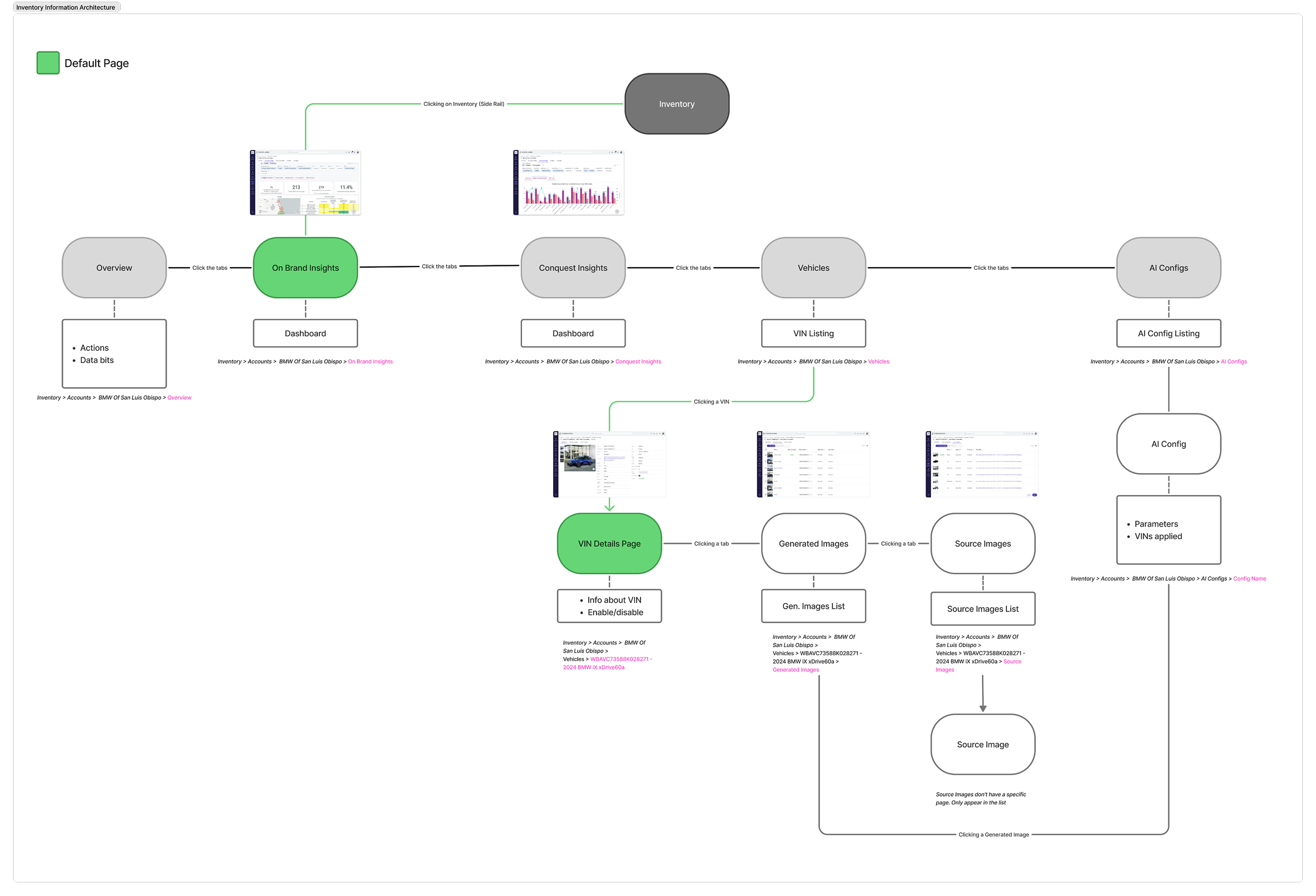
Module structure diagram — the full information architecture map used to locate bottlenecks before talking to users
Research & discovery

Two profiles, two very different needs

Interviewing the module's users revealed two profiles: one deep in heavy asset production, another handling occasional, simple results. Both needed intuitive design, but power users required finer calibration control.

Power user persona illustration

Power user

Heavy asset production
  • Needs general questions answered in place, without breaking the flow
  • Needs precise, repeatable calibration
  • Optimizes for speed and scale over exploration

Novice user persona illustration

Novice user

Occasional, simple use
  • Visits occasionally, once or twice a month
  • Needs to finish one flow start to finish
  • Optimizes for clarity over configuration
Problem definition

Built to function — not for the people using it

✓ Users mapped✓ AI model understood✓ Ready for a solution
Problems
There was no clarity on who the users were, or what they actually needed.
The tool was built to make the system function, not around real user needs.
The AI model — a replica that generates the images — was never studied to learn its real limits.
The result: a tool that was hard to use, with coverage stuck at 80%.
The bet
We mapped two user types — a novice needing smart defaults, a power user needing direct controls.
We designed around those real needs, not just around making the system work.
We deep-dived into the AI model to learn what it could do, and dropped what it couldn't.
We rebuilt it as one intuitive, canvas-based page — validated by heuristic analysis.
Design process

From one config for everything, to infinite combinations
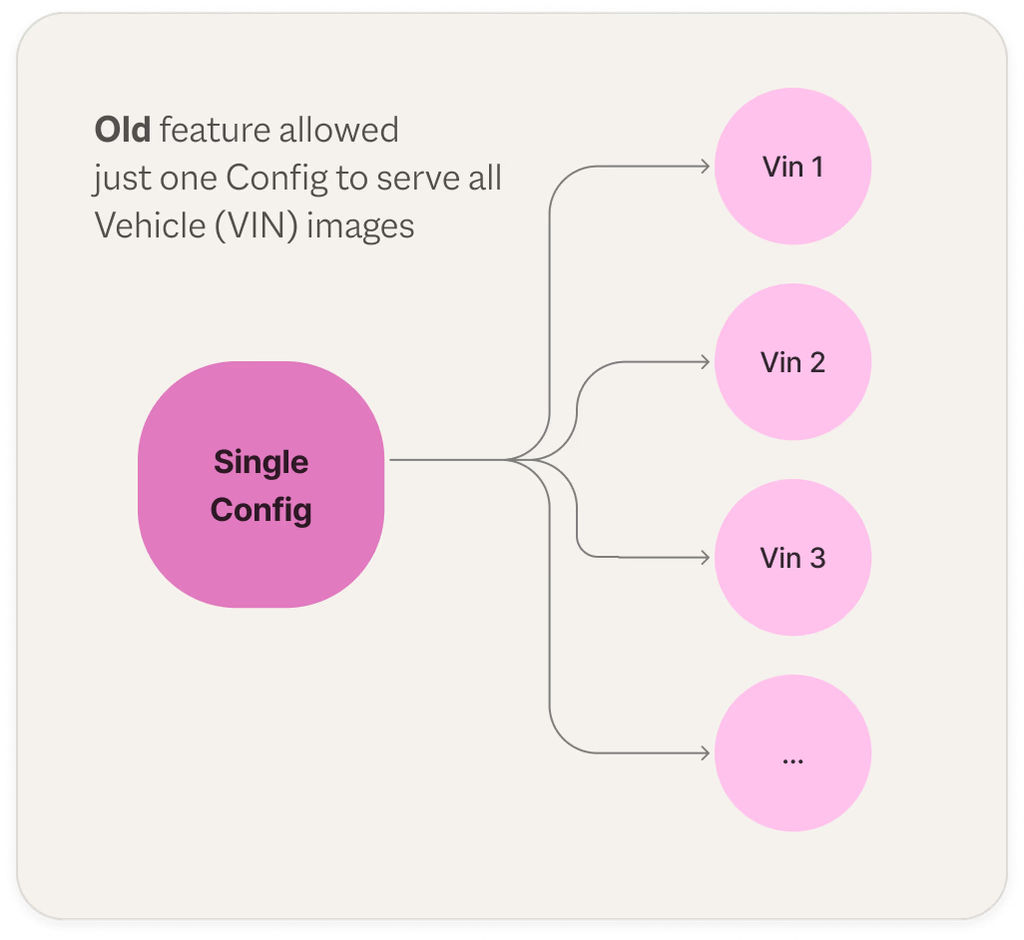
Old — single config serves all VINs
Old flow: a single config serving every VIN

We went from a flow where a single image configuration should serve several different cars, but couldn't.
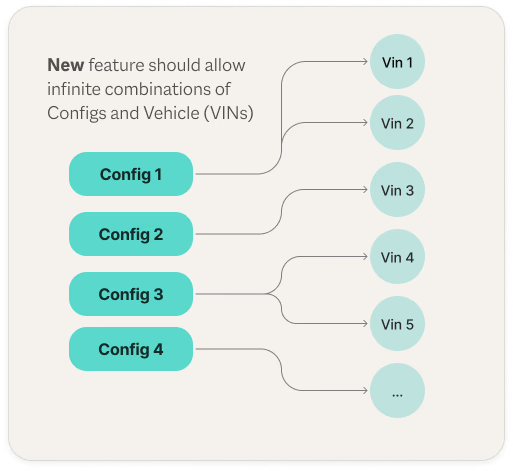
New — infinite config-to-VIN combinations
New flow: infinite combinations of configs and VINs

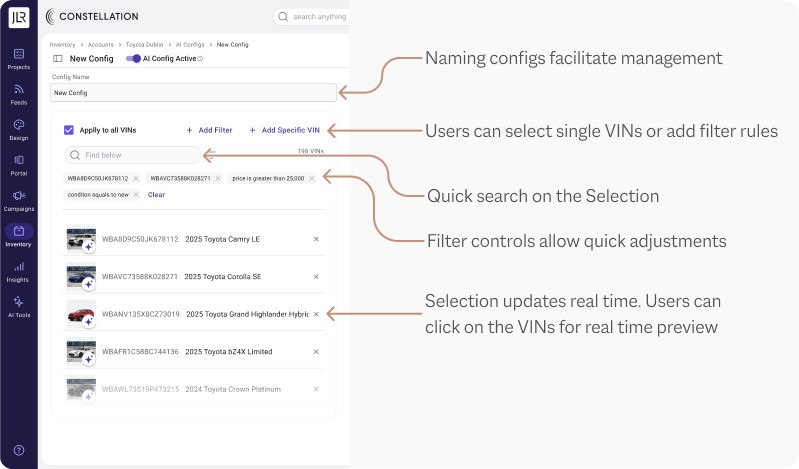
The user now has the power to create as many GenAI configurations as necessary to cover every car in inventory.

Highlights

Four moments in the new flow

Image editing

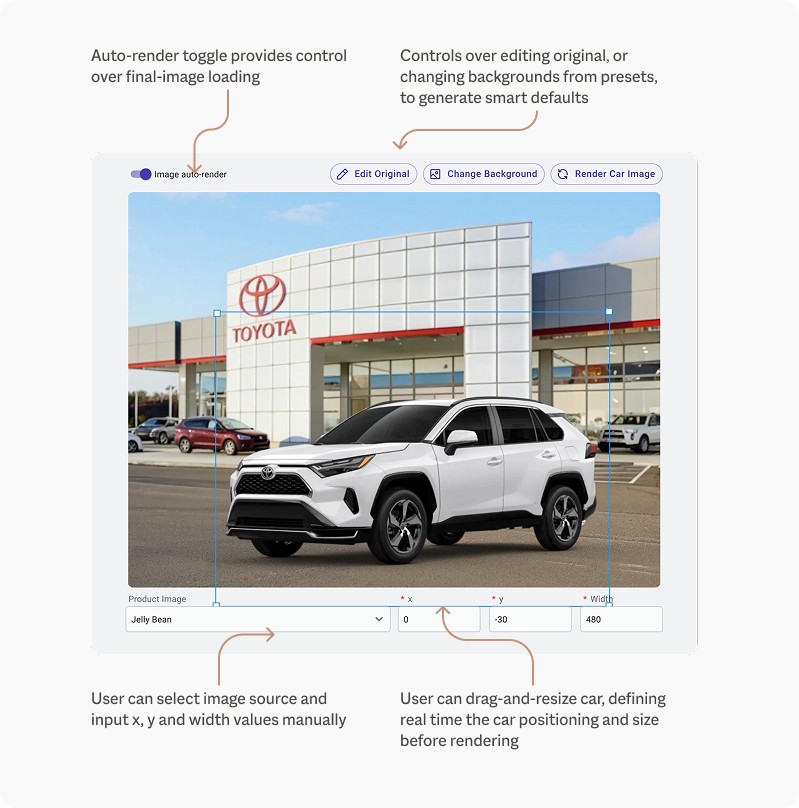
A dedicated workspace for composing the final vehicle image before rendering, with full control over background, positioning and scale.

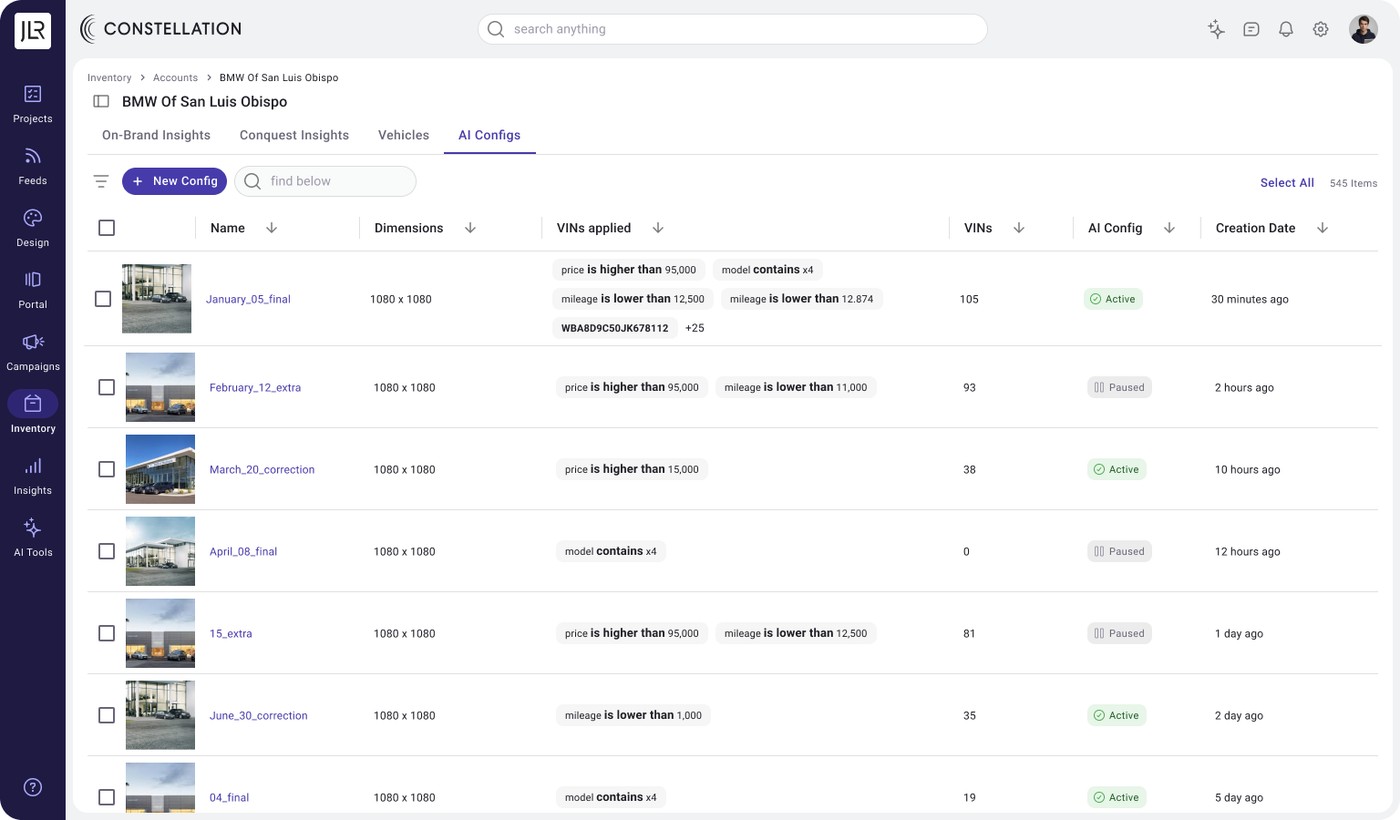
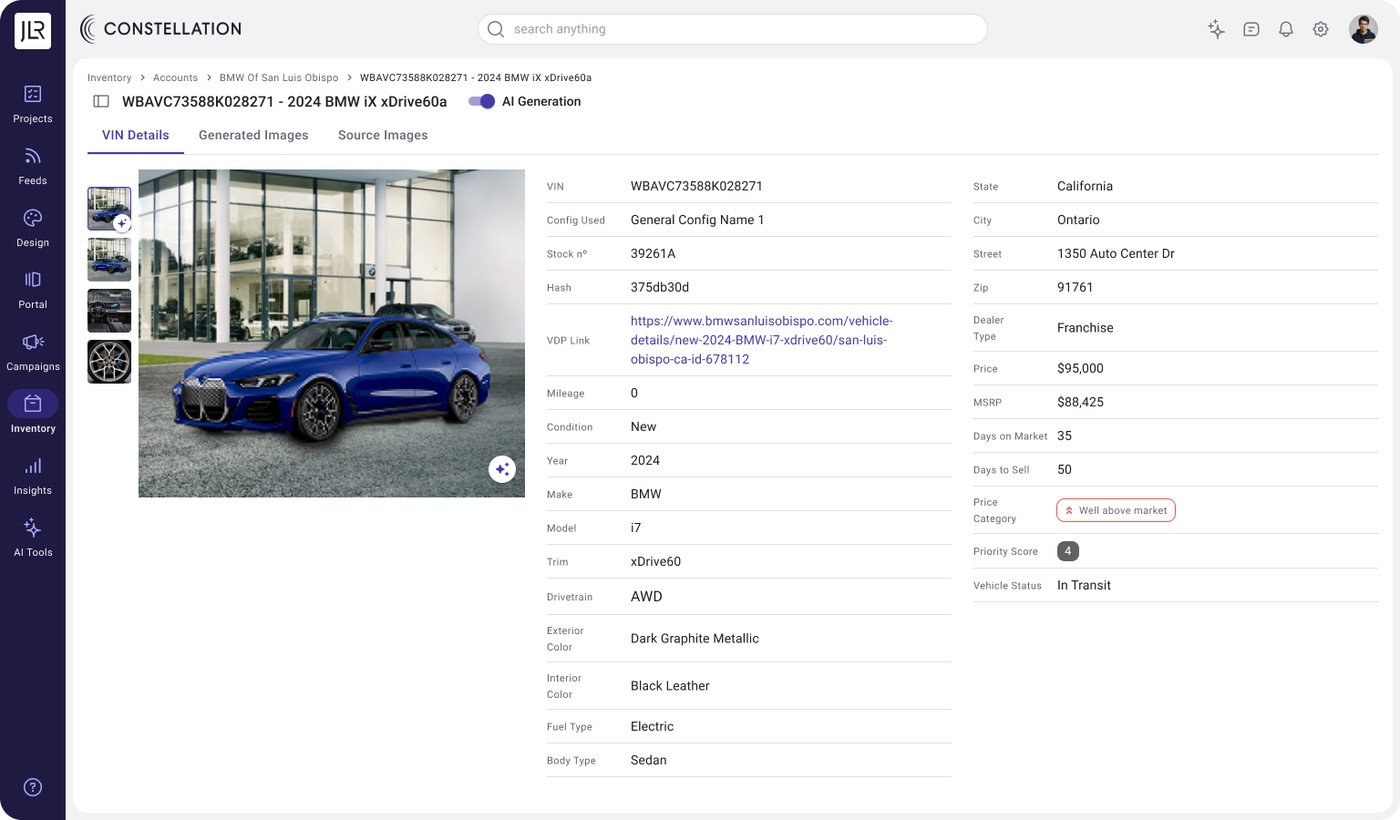
Image editing workspace, annotated: auto-render toggle, edit original or change background presets, manual x/y/width input, drag-and-resize positioningNaming and filtering configs, annotated: naming facilitates management, single or filtered VIN selection, quick search, real-time previewConfig gallery table listing every AI config, its VIN filters, coverage and statusVIN details page showing the vehicle record and its linked AI config source
Testing & validation

User testing

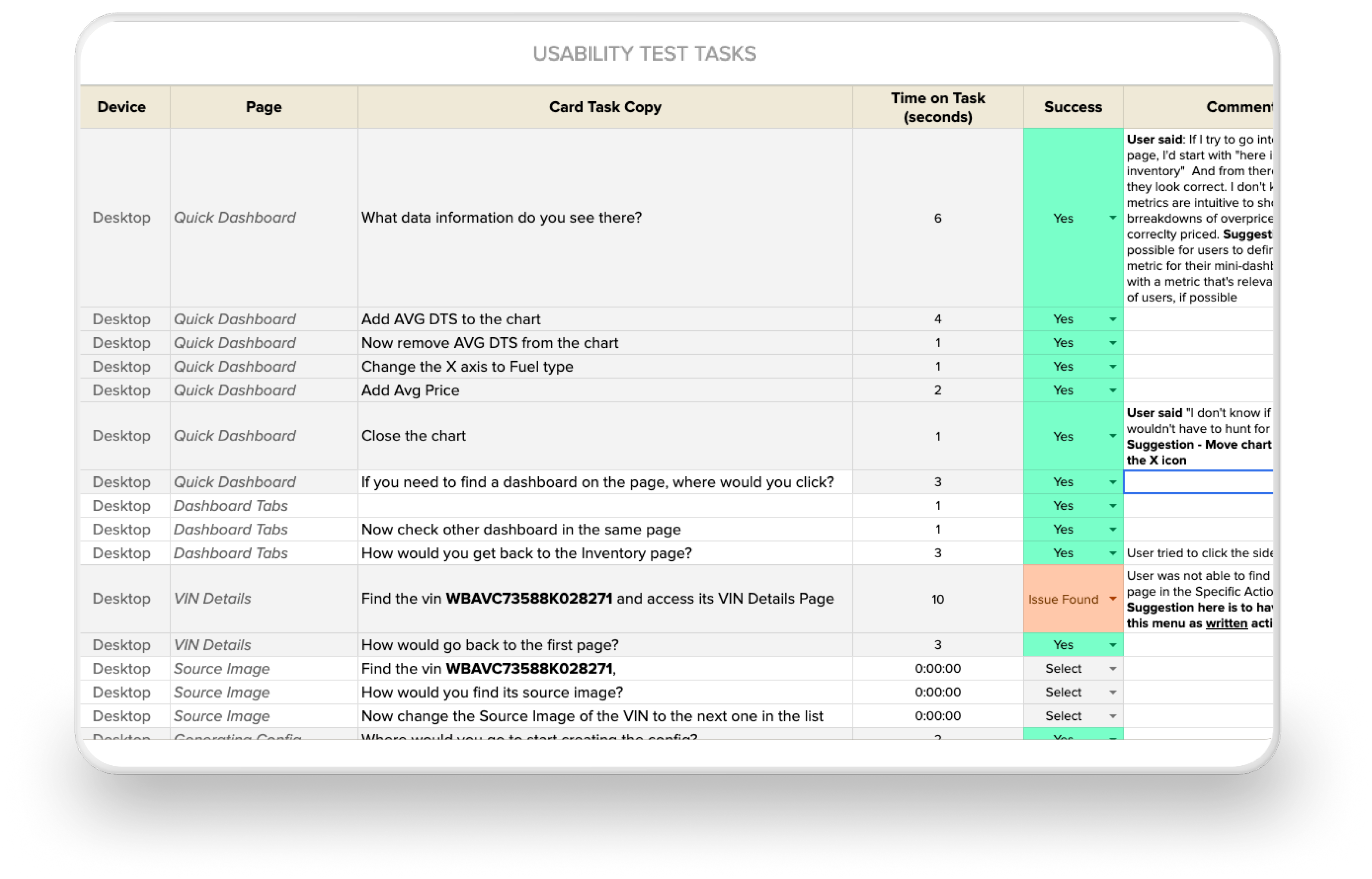
Usability test matrix — tasks, participants, time on task, success and satisfaction by screen

The tests validated not only usability improvements, but the structural soundness of the configuration model at scale.

Power users were able to execute scale tasks with no friction
Tests indicated smaller issues for novice users around vehicle-page navigation, solved for the final version
Guardrailing was essential to prevent novice users from interfering with global configs — the "config" control was isolated to a specific admin-only screen
Reflection & next steps

Learnings

Enterprise complexity cannot be removed. It must be shaped.

Simplifying enterprise workflows often removed capabilities power users relied on. Testing exposed the gaps, requiring us to restore complexity where it added value.

Balancing power and simplicity is a constant trade-off.

Power users needed advanced controls, novice users needed clarity. Progressive disclosure and smart defaults balanced both.

Effective UX does not always fit the existing data architecture.

Some interface solutions worked for users but conflicted with the platform's data model. Close collaboration with engineering found the compromise.

Finished designs? AI evolved already.

AI models evolved during the project. As newer models removed the need for background masks, part of the flow became obsolete — we redesigned to withstand rapid change.

Outcomes

What came of it

83%
Faster task completion
$2.3B
In inventory value processed
100%
Inventory coverage with the new tool
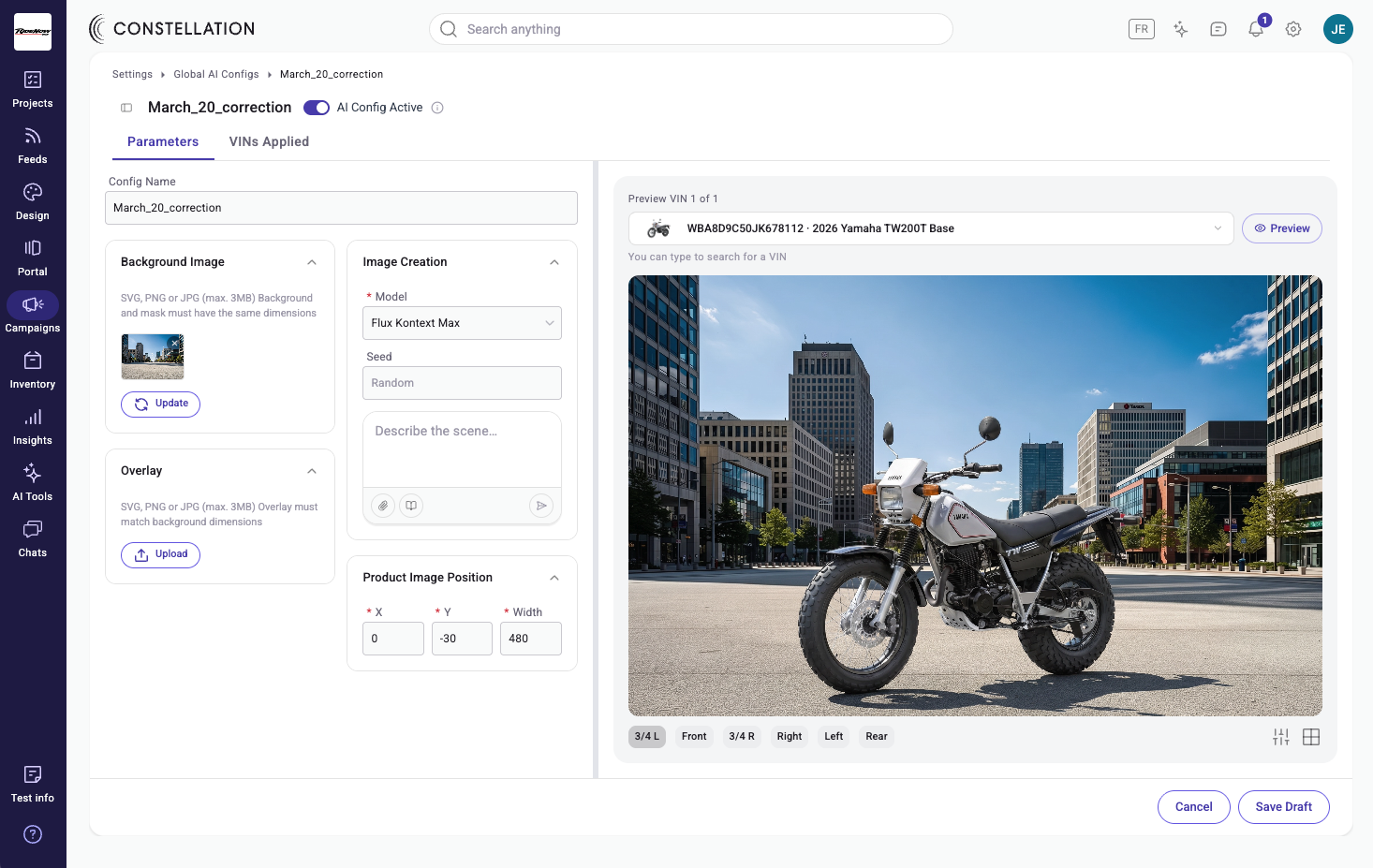
Constellation AI config editor with a live Yamaha TW200T preview

This project generated two new contracts for a multi-angle version, with Yamaha dealers in the US — worth $160k.

Next

If the project kept going

Capture on the lot

Let someone photograph the car at the dealership straight from their phone and generate the imagery on the spot — cutting the loop even shorter, if the model can hold that quality.

A proactive agent

Study when dealers refresh imagery — holidays, promotions, seasonal pushes — pre-generate smart defaults for those moments, and notify the user. They could even pre-schedule what to change and when.

01 / 17